Care circle
One circle for one person. Owners and Caregivers invite family with a link that works once. A circle invite can make someone a Caregiver or a Viewer.
Waiting list
KinCircle is for adult children and relatives who look after a parent or someone they love. Medications, visits, notes, and papers stay with the people you invite, instead of in one person's head or a long text thread.
KinCircle is a family organizer. It is not medical advice, and it is not a substitute for a doctor, a pharmacist, or emergency services.
KinCircle does not sell or rent customer data, and it does not use it for advertising. KinCircle does not train AI models on customer data, and it does not send circle data to an AI service on its own.
Outside services receive it only to run the product, or as required by law. Each one gets only what its job needs.
Some care text and family photos are stored encrypted. The care card, note and comment text, medication name, dose, schedule, dose times, days of the week, instructions, and purpose, dose-log notes, and appointment title, location, notes, place, and the other person's name are stored encrypted. Family photos are encrypted the same way, on KinCircle's server. Document files are encrypted with their own key and are not public links. The activity log can still keep a medication name or a visit title. Bills, household renewals, circle chat, contacts, places, family-tree names and notes, the person in care's display name, and document titles, notes, and words copied from a PDF are not encrypted that way. Passwords are stored as hashes, not as the password itself.
A circle is your family's shared space for one person. Home brings together upcoming visits, medications, recent notes, and a short list of what changed.
You can belong to more than one circle. KinCircle opens the one where your role is Owner, if you are an Owner anywhere, then Caregiver, then Viewer.
Owner
Looks after the circle. Can invite people, and can restore items that were deleted.
Caregiver
Can add and edit care information, and can invite a Caregiver or a Viewer.
Viewer
Can look, and can react to notes they are allowed to see. Cannot change most things.
Families coordinating care for an aging parent or another loved one, usually from a phone or a laptop.
The adult child, spouse, or relative who has been holding the list.
A brother, sister, or other relative who wants to help without waiting on a text.
A Viewer can read what their role allows, without editing the circle.

Screens from the KinCircle app, using the fictional Hayes family that ships with the demo. Margaret Hayes is not a real person, and this is not a customer.
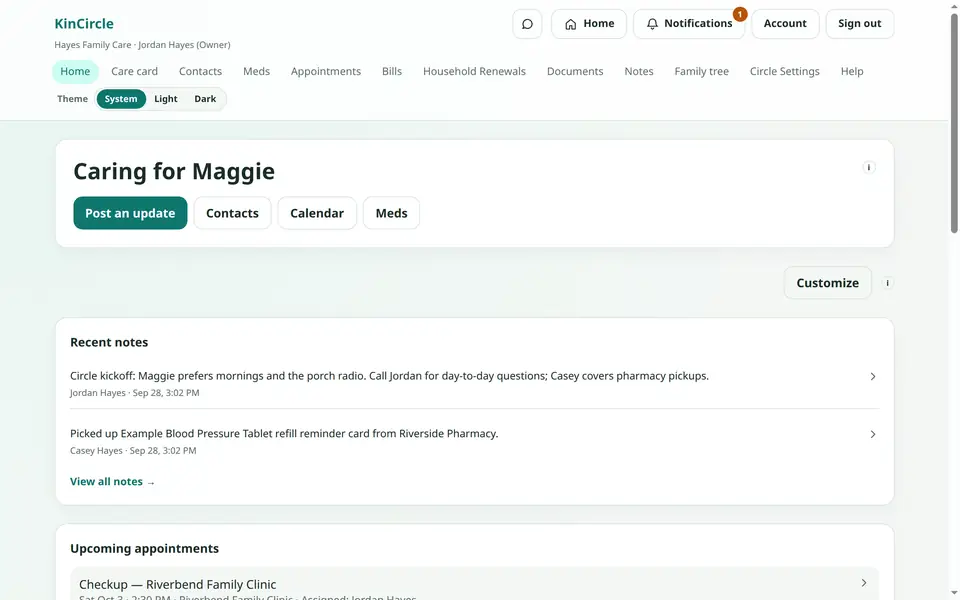
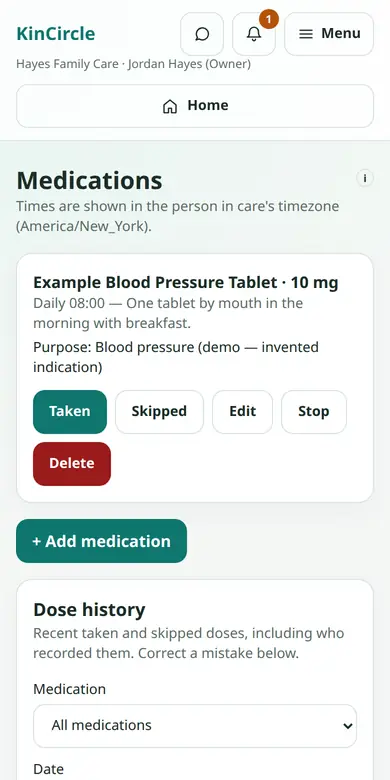
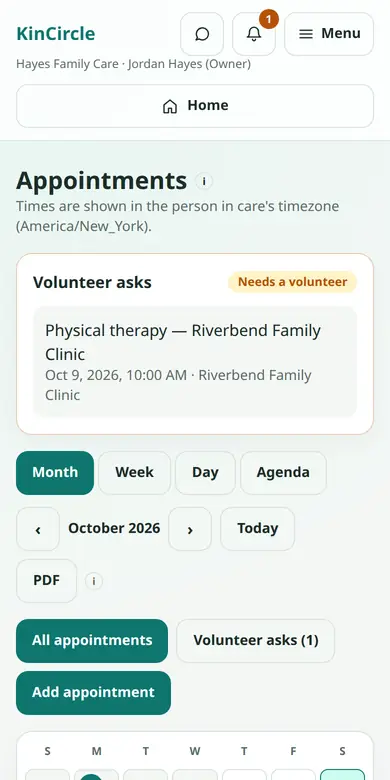
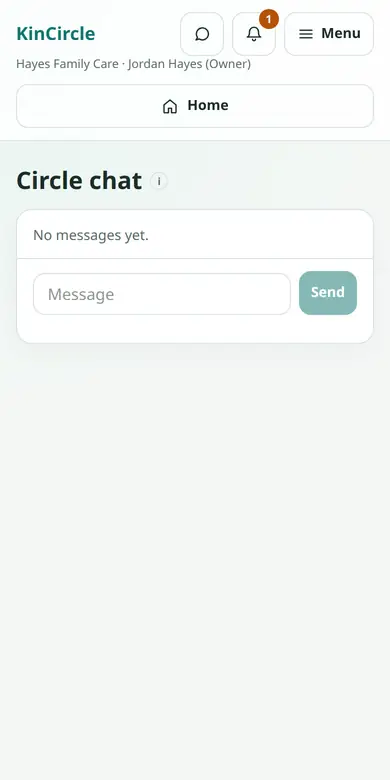
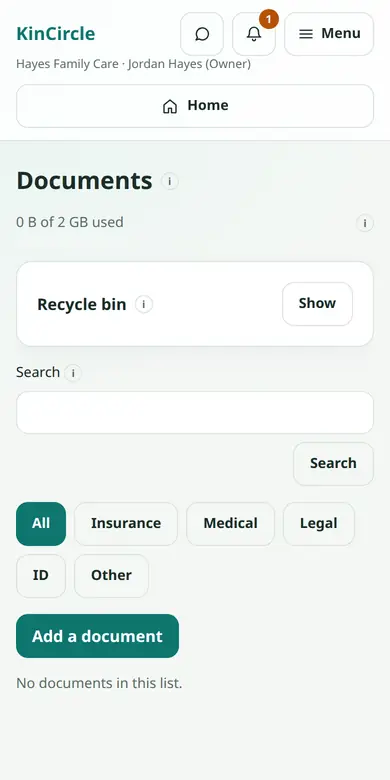
These are the tools in KinCircle today. Each one belongs to the circle, and what a person sees depends on their role.
One circle for one person. Owners and Caregivers invite family with a link that works once. A circle invite can make someone a Caregiver or a Viewer.
Who they are, family-reported allergies, daily preferences, and memories the family has written down. This is coordination, not a medical record.
Name, dose, schedule, instructions, and the reason it was prescribed. Owners and Caregivers can mark a dose taken or skipped. Viewers can look.
A shared calendar: month, week, day, or agenda. Times use the person in care's time zone. Assign a circle member, or someone who is not in KinCircle. Mark a visit that still needs a volunteer.
From Account, create a private calendar link (an ICS subscription) and paste it into Google Calendar, Apple Calendar, or Outlook. KinCircle keeps it updated. Changes you make in that calendar do not come back. Adding one visit makes a copy that does not update later.
A timestamped feed, with comments. A note can be caregivers-only, so Viewers do not see it or its comments. Viewers can react to notes they can see.
Household bills and the payments you record. A bill can repeat. Viewers see the schedule and the payee, without amounts or account details. An account number is stored as the last 4 digits only.
Insurance, taxes, registration, and inspection dates. Record when something was renewed or filed. Viewers see what is due and when, without costs, policy numbers, or confirmation numbers.
Insurance cards, policies, IDs, and other papers. Files are encrypted, stay on KinCircle's server, and are not a public link. A document can be hidden from Viewers. Deleted files sit in a recycle bin for 30 days.
Day-to-day messages for Owners and Caregivers, separate from care notes. Viewers cannot read or send them. A lock-screen notice, if you turn reminders on, says only that there is a new message.
People around the person in care, and how they are related. Owners and Caregivers can edit. You can download a picture of the tree, or a data file for that circle.
Phone numbers and the places the circle uses, such as home, a pharmacy, or a clinic.
Add KinCircle to your Home Screen and open it like an app. Reminders stay off until you turn them on for that browser. On an iPhone, add it to the Home Screen and open it from that icon first. A visit assigned to you can show the day and time. A bill or renewal notice stays short, without amounts or policy details. Medication dose times are not sent this way.
Off until you turn it on from Account. Around Sunday 6:00 PM in your main circle's time zone, it can include the next 7 days of visits, medication list changes from the past week, and the first line of new notes. A quiet week sends nothing. Viewers do not receive caregivers-only notes. The message has an unsubscribe link.
Download a PDF of the week or month on screen. It lists the visits you can already see, in the person in care's time zone, with blank lines for handwritten notes.
Sign in with a password. When the server allows it, you can add an authenticator app (two-factor sign-in) and one-time recovery codes. A passkey can be saved on this device or in a password manager, and signing in with it skips the authenticator step. Google sign-in and an email link are available only when the server offers them. Google does not create an account by itself.
Three steps. Joining the waiting list does not open a circle. Signing in joins a circle you were invited to.
Leave your name on this page. When a place can be opened, KinCircle invites an Owner. Sign in, or create an account from that invite.
An Owner or a Caregiver sends a one-time link and chooses Caregiver or Viewer. A Viewer can look. A Caregiver can update the circle.
Add visits, medications, notes, and papers as things change. Home shows what is coming up, so you are not reconstructing it from old texts.
Your circle is for the people you invite. KinCircle does not sell or rent customer data, and it does not use it for advertising. KinCircle does not train AI models on customer data, and it does not send circle data to an AI service on its own.
Outside services receive it only to run the product, or as required by law. Each one gets only what its job needs. Cloudflare delivers the public site. This waiting list is stored in Cloudflare D1. A Turnstile check runs for the waiting list and the contact form, and it does not receive the words you type. Resend sends email when that is turned on, including the contact form, which is not stored in KinCircle. A message can include the care details that email is for, such as a visit title, a medication name, or a short note preview. Browser push services (Chrome uses Google, Firefox uses Mozilla, and Safari uses Apple) receive the short reminder and that browser's push address, only if you turn reminders on. When Google sign-in is turned on, Google receives the sign-in request. KinCircle keeps the verified email and Google's account id. KinCircle does not open Gmail or any other Google product. If you create a token, that assistant can read what your role can already see, including document files. KinCircle does not pick the assistant, and it does not send circle data to one unless you create the token.
Pricing will be announced at launch. Join the waiting list to be the first to know.
We'll email this address when pricing is announced and when a place can be opened. We also keep your name and anything you choose to add. We don't sell this. The signup is stored in Cloudflare D1 so this form can run.
Leave your name and email. We will write when pricing is announced, and when a place can be opened for your family.
You're on the list. We'll email you when KinCircle can open a place for your family.
If you were already on the list, you only needed to join once. To be removed, use our contact form.
Guides families often use while they figure out shared care. External links; KinCircle is not affiliated with AARP.
A starting point for family caregiving, from day-to-day help through planning ahead.
Short guides for someone new to this, including care at home and helping from far away.
Ways to keep one medication list and make missed doses less likely.
How relatives who do not live nearby can divide tasks and stay in the loop.
Signs that the stress of caregiving is building, and steps that can lighten it.
Checklists a family can download when they are getting ready to share care.
Short answers from how KinCircle works today. Longer answers are in Help, inside the app.
No. KinCircle does not sell or rent customer data, and it does not use it for advertising. KinCircle does not train AI models on customer data, and it does not send circle data to an AI service on its own. Outside services receive it only to run the product, or as required by law. Each one gets only what its job needs. Cloudflare delivers the public site. This waiting list is stored in Cloudflare D1. A Turnstile check runs for the waiting list and the contact form, and it does not receive the words you type. Resend sends email when that is turned on, including the contact form, which is not stored in KinCircle. A message can include the care details that email is for, such as a visit title, a medication name, or a short note preview. Browser push services (Chrome uses Google, Firefox uses Mozilla, and Safari uses Apple) receive the short reminder and that browser's push address, only if you turn reminders on. When Google sign-in is turned on, Google receives the sign-in request. KinCircle keeps the verified email and Google's account id. KinCircle does not open Gmail or any other Google product. If you create a token, that assistant can read what your role can already see, including document files. KinCircle does not pick the assistant, and it does not send circle data to one unless you create the token. Some care text and family photos are stored encrypted. The care card, note and comment text, medication name, dose, schedule, dose times, days of the week, instructions, and purpose, dose-log notes, and appointment title, location, notes, place, and the other person's name are stored encrypted. Family photos are encrypted the same way, on KinCircle's server. Document files are encrypted with their own key and are not public links. The activity log can still keep a medication name or a visit title. Bills, household renewals, circle chat, contacts, places, family-tree names and notes, the person in care's display name, and document titles, notes, and words copied from a PDF are not encrypted that way. Passwords are stored as hashes, not as the password itself. The privacy policy is the full account.
No. It is a shared organizer for a family. It is not medical advice, and it is not a substitute for a doctor, a pharmacist, or emergency services. Allergies on the care card are what the family wrote down.
Other KinCircle users cannot open your circle. People in the circle see information according to their role. Viewers do not see caregivers-only notes or documents, circle chat, bill amounts, or the cost and policy details on household renewals.
On Account, create a private calendar link and paste it into Google Calendar, Apple Calendar, or Outlook. That subscription stays updated from KinCircle. Edits in the phone calendar do not write back. You can also add a single visit. That copy does not update if the visit changes later. If the link leaks, revoke it on Account and create a new one. Changing your password also turns the link off.
They stay off until you turn them on for that browser, from Account. On an iPhone, add KinCircle to your Home Screen, open it from that icon, then turn reminders on. For a visit assigned to you, the notice can say the day and time, such as “Appointment tomorrow at 2:00 PM,” without the visit name or place. Owners and Caregivers can also get a short notice that a bill or a household renewal is due, without amounts or policy details. A new chat message can say only “New message in your circle.” Medication dose times are not sent as these reminders.
It is off until you turn it on from Account. Around Sunday 6:00 PM in your main circle's time zone, KinCircle can email the next 7 days of appointments, medication list changes from the past 7 days, and the first line of new notes and comments. Taken or skipped doses are not included. Viewers do not receive caregivers-only notes. A quiet week sends nothing. The message has an unsubscribe link that works without signing in.
Pricing will be announced at launch. This page does not list a price. Join the waiting list to be the first to know.
No. Join the waiting list. A circle is opened for your family and an Owner is invited. Create an account from that invite, or sign in if you already have one. After that, an Owner or a Caregiver invites the other people. To be removed from the list, use our contact form.
Yes. It works in the phone browser. You can add it to your Home Screen so it opens like an app. Each browser is its own choice for reminders.
Open Help in the app, or contact us via our contact form. The privacy policy and terms of use live with the app.
Join the waiting list to be the first to know when pricing is announced, and when a place can be opened. If you already have an invite, sign in.